Custom List Tool: Templating and Auto-Scheduling

March 2, 2019

Life is busy—there are more things we need to do in a day than there are hours available! We understand that for some people, looking at product is a necessity, and for others, it is an ever-eluding desire. You wish you could carve out an hour of your day (or week) to check out what’s new at Book Depot, but it becomes an afterthought in all of the hustle and bustle of your day-to-day schedule.

With Book Depot’s new Custom List tool, we have created a very easy way for you to make a custom shoppable list on our website that will save you time! This tutorial focuses on the final steps before you complete your list, where you have the ability to template and auto-schedule it so that reviewing Book Depot product is quicker and easier than ever. The goal of this tool is to give you more control over the flow of information and create helpful ways to fit our product lists into your schedule!

What exactly do we mean by template? If you think of it in terms of a word processing or design template, it is a structure that allows you to repeat a pattern using a predetermined set of guidelines. In terms of creating a Book Depot catalog template, you have the ability to save the filters you are interested in seeing (categories, publishers, bindings, etc.) and repeat that query as often you would like against our ever-changing inventory.


Video Tutorial

Here is a brief video tutorial to show you how to use this tool:


Step-by-Step Instructions

Let’s walk through a simple scenario to demonstrate how to use the tool. Say you only want to create a board book list. We will create a simple catalog by selecting format from our list of editable attributes, and then selecting board books from the full list of formats.


FINALIZE

Moving ahead to the Finalize page, you now have the ability to take your list and template it, and then schedule an email so you are automatically notified at the frequency of your choosing. The first thing you will want to do on the Finalize page is name your list (in this instance we will just call it “Board Book List”). Next, click the checkbox beside Create as template. Once you check that box, a new menu of options will pop up. This is the convenient Auto-Scheduling tool, which gives you the ability to have your list sent to you by email as often as you would like. Let’s break down each option.


Recurrence Pattern

The first element you will want to set is your Recurrence pattern. This is where you will select the regular frequency of the email—weekly, monthly, or yearly.


Start and End Date

After you select your frequency, you can select your start date and end date. The start date is the first day you would like your list emailed to you. The end date is preset to run indefinitely, but you can select a final date if you wish.


Weekly/Monthly/Yearly

The section below the start and end dates will change depending on your recurrence pattern.


Weekly

If your pattern is to send weekly, you will have the ability to modify the time gap between sends. For instance, if you only want to receive the list every other week, you can select weekly for your recurrence but increase the numeric field to 2 so that it says “Send every 2 weeks.” If you leave this field set at 1, you will receive the list every week. From here, you can choose which weekdays you would like to receive your list email. You have the ability to select as many days as you would like.


Monthly

If you select monthly, you will see that this section changes slightly. You now have the ability to send your list every set number of months on the day of your choosing. For example, “Send every 2 months on day 15” means that your list will be emailed to you every other month on the 15th of that month.


Yearly

When you change the recurrence pattern to yearly, the section slightly changes again. Now you have the ability to select the yearly frequency as well as the day of your choosing. When the date field is selected, a small calendar will appear to help you select the month and day. The yearly option would be helpful in an instance where you have an event you need to buy for only once a year. You now have the ability to build a template and schedule it to be sent to your email annually.


Email Notification

The last section allows you to include the email address(es) your list will be sent to as well as customize the email message itself. The default email address is the one that is associated with your account. However, if you would like to replace your default email with a different one, you can do so by clicking the small “x” on the right-hand side of the blue button. Here, you also have the ability to add additional emails if you would like others on your team to receive these regular lists as well. As for the messaging, we have a default subject line as well as a blank body paragraph that will populate once the email is sent, but you can change and/or add any other information you would like.


Create

Now that you have entered all of your preferences, you are ready to click the green Create button. By clicking Create, you have officially saved your template and scheduled your recurring email. You are now done and can put your feet up as you wait for your next list email to arrive!


Template and Auto-Schedule Screenshot


QUESTIONS?

If you have any questions about this tool or any other functions of our Custom List tool, please contact us!

Email: [email protected]

Phone: 1-800-801-7193

Sidebar

Custom List Tool: Categories and Subjects List

February 28, 2019

Categories may be an area where you wouldn’t think you would need a tool to assist you in browsing our online book selection. We already include a list of categories on the side bar of our pages that easily filters the list of titles—what could be easier?


What the website does not currently offer, however, is the ability to compile as many categories and subjects as you desire into one list, which makes the category selection tool extremely valuable! For example, if you have a store that specializes in science fiction books, you would need to go to the Fiction category on the website and select the Science Fiction subject (and maybe Fantasy as well). However, this filtering would only include adult titles. You may also be interested in young adult and tween science fiction titles so then you would head to the Young Adult Fiction category and select the Sci-Fi subject, followed by a look through the Tween category with the Sci-Fi subject as well. By doing this, browsing the titles that you are interested in can become a tedious process. Here is where the Category/Subject List Tool is going to save you time and allow you to generate all the titles that are of interest to you.


Through this example, you can start to see how useful this tool really is! For further flexibility, once you have created a list that includes all of your interests you also have the ability to save it all into a single template and have that delivered to your inbox as often as you like. Now that is a timesaving tool!


Video Tutorial

Here is a brief video tutorial to show you how to use this tool:


Step-by-Step Instructions

Once you are logged into your account, you can find our Custom List tool under the profile icon at the top of the webpage in My Lists (or by clicking here). When you get to the page, you may notice that you already have a list or two already created. These are example lists we have created for you to help get you started and to aid your browsing experience.


GETTING STARTED

To create a Category list, start by clicking on Create. You will see a list of several attributes that you can create a list from. For the purpose of this tutorial, check the box next to Category and select Next to proceed to the next page.


CATEGORY

On the Category page, you are first presented with many category options. Once a category is selected, the corresponding subject options will appear. From there you have the ability to select as many categories and subjects as you would like!


Book Depot Knowledge Center - Categories and Subjects List


Let’s walk through the example presented at the beginning of this tutorial to demonstrate how exactly this tool works. Start by clicking on Fiction under the list of categories. Once selected, a second list of options appear that display all the subjects under the category that was selected. Travel down the list and select the subjects of interest or click Select All if you would like to proceed with the entire list of subjects available.


For the purpose of this example, we only want a couple of the subjects under fiction, so we will select Science Fiction and Fantasy as our subjects. As you select your subjects you will see a number at the top increase, displaying how many subjects are selected. From here we can continue the same process with additional categories. Again, to follow through on this specific example, we will select Tween Fiction as the category and then Sci-Fi as the subject. Finally, we will select Young Adult Fiction as the category and then Sci-Fi as the subject. Now that this list covers three different categories and a few subjects, let’s move onto the next page.


REPORT FIELDS

On the Report Fields page, you have the ability to select the information you would like included in your downloadable Excel spreadsheet list. We have preselected several for you but you can alter these options to whichever you prefer. You even have the option to include the cover image, but please note that if your list exceeds 1,000 titles, the images will not appear due to file size constraints. When you are satisfied with your selections you can continue to the final step by clicking Next.


FINALIZE

On this last page, you will finalize your list and then move it to a shoppable format or create a template from the list and schedule it to be delivered to you by email. The Review section gives you the ability to make any last-minute changes to any of the attributes that make up your list. Since we only selected Category for this list, all the other attributes listed should have All included or No filters applied listed. The only attribute that will be impacted from this tutorial is Category & Subjects, and that will specify how many categories and subjects you selected.


The Name section is your next step, where you simply need to name your list. Once you have done that, you have the option to create a template by checking the box beside Create as template. If you choose to create the template, a scheduling program will appear that gives you several options including frequency of recurrence (weekly, monthly, yearly), start and end dates, day of the week, etc. You need to include the email address(es) that you want to send to list to, and you can also create a subject and message for that email to remind you of what you are receiving. Whether you choose to create a template or not, you must finalize the list by clicking on the green Create button at the bottom of the page.


TEMPLATES

If you decided to just create a list and not make it into a template, you will see a pop-up to either view the list on our site using a special viewing page which allows you to add items to your cart, or to download the list to an Excel spreadsheet.

If you chose to create a template, you will see that list under My Templates. To view it immediately, you need to select Create Now and that list will be moved over to My Lists. By doing so, you now have the ability to open it on the custom view page on the site, or you can also download it to an Excel spreadsheet under Actions.


QUESTIONS?

If you have any questions about this tool or any other functions of our Custom List tool, please contact us!

Email: [email protected]

Phone: 1-800-801-7193

Sidebar

Custom List Tool: Multiple Keyword Search

February 1, 2019

Have you ever found yourself searching keyword variation after keyword variation to see all of the books available about a certain topic? The time has come where that manual (and no doubt tedious) process is no longer needed!

With Book Depot’s new Custom List tool, we have created a very easy way for you to search your keywords in our list generator. Now you have the ability to enter multiple keywords at one time and receive an immediate list of all the results where the keywords appear in the title and/or overview! For example, if you are interested in a list of keywords that is pertinent to your location, you may be searching for words related to the city, state, province, and/or country as well as any significant terms tied to your surrounding landmarks or geographical features. Now you can take all those keywords, compile them into one list, and search that against our entire inventory to find books that will be important to your business.

What’s even better is that once your list is created, you can refer back to it as often as you want or even create a template to have that list emailed to you at the frequency of your choosing.


Video Tutorial

Here is a brief video tutorial to show you how to use this tool:


Step-by-Step Instructions

Once you are logged into your account, you can find our Custom List tool under the profile icon at the top of the webpage in My Lists (or by clicking here). When you get to the page, you may notice that you already have a list or two already created. These are example lists we have created for you to help get you started and to aid your browsing experience.


GETTING STARTED

To create a Keyword list, start by clicking on Create. You will see a list of several attributes that you can create a list from. For the purpose of this tutorial, check the box next to Keywords and select Next to proceed to the next page.


KEYWORDS

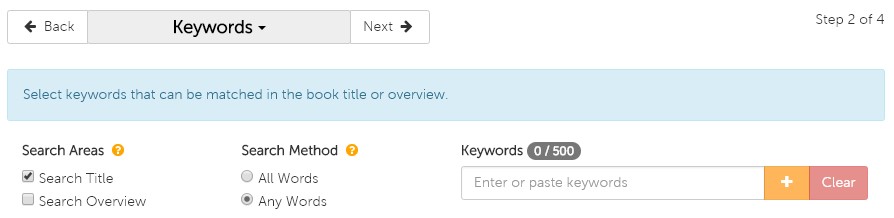
On the Keyword page, you are presented with a couple options before you begin your search—Search Areas and Search Method.


Keyword options


Search Areas

Search Areas determines which fields are included in the search. Under Search Areas, you are given three options:

  1. Search Title: search for your keywords in only book titles
  2. Search Overview: search for your keywords in only book overviews
  3. Both (check the boxes beside both Search Title and Search Overview): search for your keywords in both book titles and overviews

The default is set to search titles only but if you would like a more comprehensive search, we recommend you select both.


Search Method

Search Method determines how exact you would like the list generator to be when populating your list. Under Search Method, you are given two options:

  1. All Words: the search will look for results that include all keywords that are entered (e.g. if you were to enter 10 keywords, only results that include all 10 will be populated)
  2. Any Words: the search will look for results that include any of the keywords that are entered

The default is set to search any words, which will be most commonly used.


Now it’s time to add your keywords! You can either type them in one by one and click the  symbol after typing each keyword, or if you have a list already created in a text file or Excel spreadsheet, you can copy and paste that into the search bar. You can see how many words you have added on the counter just above the search bar, where you will be capped at 500.


REPORT FIELDS

On the Report Fields page, you have the ability to select the information you would like included in your downloadable Excel spreadsheet list. We have preselected several for you but you can alter these options to whatever you prefer. You even have the option to include the cover image, but please note that if your list exceeds 1,000 titles, the images will not appear due to file size constraints. When you are satisfied with your selections you can continue to the final step by clicking Next.


FINALIZE

On this last page, you will finalize your list and then move it to a shoppable format or create a template from the list and schedule it to be delivered to your email. The Review section gives you the ability to make any last-minute changes to any of the attributes that make up your list. Since we only selected Keywords for this list, all the other attributes listed should have All included or No filters applied listed. The only attribute that will be impacted from this tutorial is Keywords, and that will specify how many Keywords you selected.

The Name section is your next step, where you simply need to name your list. Once you have done that, you have the option to create a template by checking the box beside Create as template. If you choose to create the template, a scheduling program will appear that gives you several options including frequency of recurrence (weekly, monthly, yearly), start and end dates, day of the week, etc. You need to include the email address(es) that you want to send to list to, and you can also create a subject and message for that email to remind you of what you are receiving. Whether you choose to create a template or not, you must finalize the list by clicking on the green Create button at the bottom of the page.

If you decided to just create the list and not template it, you will see a pop-up to either view the list on our site using a special viewing page which allows you to add items to your cart, or to download the list to an Excel spreadsheet.


TEMPLATES

If you chose to create a template, you will see that list under My Templates. To view it immediately, you need to select Create Now and that list will be moved over to My Lists. By doing so, you now have the ability to open it on the custom view page on the site, or you can also download it to an Excel spreadsheet under Actions.


If you have any questions about this tool or any other functions of our Custom List tool, please contact us!

Email: [email protected]

Phone: 1-800-801-7193

Sidebar

Custom List Tool: Favorite Authors List

January 16, 2019

We think it would be fair to say that many wholesale buyers likely have a go-to list of their favorite authors—whether it’s written down or just a mental list—whose books typically guarantee sales and are always in demand by customers.

With Book Depot’s new Custom List tool, we have created a very easy way for you to upload your unique author list(s) of any size to our list generator. There is no longer a need to plug in one author at a time in the search bar. Now you can upload them all at once and shop the entire list! Once your list is created, you can refer back to it as often as you want or even create a template to have that list emailed to you at the frequency of your choosing.


Video Tutorial

Here is a brief video tutorial to show you how to use this tool:


Step-by-Step Instructions

Once you are logged into your account, you can find our Custom List tool under the profile icon at the top of the webpage in My Lists (or by clicking here). When you get to the page, you may notice that you already have a list or two already created. These are example lists we have created for you to help get you started and to aid your browsing experience.

GETTING STARTED

To create a Favorite Authors list, start by clicking on Create. You will see a list of several attributes that you can create a list from. For the purpose of this tutorial, check the box next to Author and select Next to proceed to the next page.

AUTHOR

On the Author page, allow a few seconds for the page to load with the thousands of authors that are in our database. In the filter bar you can start typing in the names of your targeted authors, but please remember to use the sequence: last name, first name. As you type in the name, the list will begin to filter down your selection until you see the author you are looking for. When you see the author’s name that you are interested in, simply check the box next to their name. You will now see number alongside the Author heading above the filter bar indicating how many authors you have selected.

To make this process even quicker for you, you also have the option to import a list that you have already created in either a text or Excel file. Simply copy and paste your list into the filter bar, remembering again to use the correct format (last name, first name), and all the author matches we have in our database will be added to your list. When you have added all the names you desire, you can move onto the next page by clicking Next.

REPORT FIELDS

On this next page, you have the ability to select the information you would like to be included in your downloadable Excel spreadsheet list. We have pre-selected several for you but you can alter these options to whatever you prefer. You even have the option to include the cover image, but please note that if your list exceeds 1,000 titles, the images will not appear due to file size constraints. When you are satisfied with your selections you can continue to the final step by clicking Next.

FINALIZE

On this last page, it’s now time to finalize your list and then move it to a shoppable format or create a template from the list and schedule it to be delivered to your email. The Review section gives you the ability to make any last-minute changes to any of the attributes that make up your list. Since we only selected Authors for this list, all the other attributes listed should have All included or No filter applied listed. The only attribute that will be impacted from this tutorial is Authors, and that will specify the number of authors you have selected for your list.

The Name section is your next step, where you simply need to name your list. Once you have done that, you have the option to create a template by checking the box beside Create as template. If you choose to create the template, a scheduling program will appear that gives you several options including frequency of recurrence (weekly, monthly, yearly), start and end dates, day of the week, etc. You need to include the email address(es) that you want to send to list to, and you can also create a subject and message for that email to remind you of what you are receiving. Whether you choose to create a template or not, you must finalize the list by clicking on the green Create button at the bottom of the page.

If you decided to just create the list and not template it, you will see a pop-up to either view the list on our site using a special viewing page which allows you to add items to your cart, or to download the list to an Excel spreadsheet.

TEMPLATES

If you chose to create a template, you will see that list under My Templates. To view it immediately, you need to select Create Now and that list will be moved over to My Lists. By doing so, you now have the ability to open it on the custom view page on the site, or you can also download it to an Excel spreadsheet under Actions.

If you have any questions about this tool or any other functions of our Custom List tool, please contact us!

Email: [email protected]

Phone: 1-800-801-7193
Sidebar

Customer Success Story: Royal Botanical Gardens

October 24, 2018

Customer Success Story: Royal Botanical Gardens


Royal Botanical Gardens’ Background

Royal Botanical Gardens (RBG) is the largest botanical garden in Canada, a national historic site, and registered charitable organization with a mandate to bring together people, plants, and nature. RBG protects and restores over 2,000 acres of nature sanctuaries and creates gardens that beautify the landscape. They also serve tourists and locals by hosting events and educating about the work they do through tours and their gift shop. RBG’s gift shop sells educational games, garden decor, figurines, books for kids and adults alike, and much more.

RBG’s began selling bargain books in 2008 and became a Book Depot customer in 2009. Since then, their sales have continued to grow year after year. What started out as an endcap of bargain books to give them a try soon grew to two endcaps – one for adults and one for kids. With the demand for more, RBG continued to expand their bargain book selection by branching out to tables in front of the gift shop and even added two additional rolling racks. Even with the extra display space focused on books, they still receive interest for more; however, due to a lack of space, the gift shop physically can’t add any more.


Solution

With RBG’s demand for bargain books continually increasing, they had to get creative with their space to maximize sales. By purchasing more books than they are able to display at one time, RBG can rotate their available stock to keep their displays updated. Book Depot’s variety gives RBG the freedom to cater their selection to their customer base during the interests of the season as well as their special exhibits.


Results

Increase in Sales: RBG’s bargain book sales have increased tenfold over the last ten years.

Not only does Royal Botanical Gardens have tourists visiting the gift shop, but since carrying bargain books, they also have regulars who come with the intent to buy books. By offering a wider variety of items that appeal to the interests of their customer base, RBG has done what many gift shops do not do and that is appeal to a regular stream of locals. By doing so, they have been able to increase their store’s traffic on a day-to-day basis while ultimately increasing store sales.


Quote

“Book Depot offers us a great selection of books at great prices, which we pass on to our customers. This has made us a destination for many people in our area. Books have become one of the top-selling categories in our gift shop.”

Linda Palichuk, Gift Shop Manager – Royal Botanical Gardens

Sidebar

Selling Sidelines

October 10, 2018

As booksellers, we all know that books are our bread and butter. We all have a great affection for book product—the smell, the feel, the comfort of having a book in our hands. We live and breathe books. Our customers come to our bricks-and-mortar store looking for that special feeling. But what if we could add some jam to that bread and butter? Seriously, who doesn’t like jam? Adding additional product lines to your overall assortment can significantly add a layer of “jam” to your bottom line!


At Book Outlet, our retail store in St. Catharines, Ontario, Canada, we have recently added many new non-book items to enhance our customers’ shopping experience. These product lines do not take away from our book product. Quite the opposite! These non-book product lines actually enhance the overall book shopping experience. We carry many different product lines, including greeting cards, toys, mugs, cozy socks, candles, candy, tote bags and many, many more. We do our best to cater to our core book customers and we look for non-book items we know our bookworm customers will love. We have also added smaller/lower priced non-book product, such as chewing gum, hand sanitizer, bookmarks, etc. around our cash line for impulse shopping! This increases the chances for these non-book items to become add-on purchases, which increases basket size, adding to your overall profitability. Last year, our non-book product represented 17% of our total sales in-store! Finding the perfect mix of non-book items along with great cross merchandising ideas are key to making a cohesive shopping experience.


Our team at our St. Catharines store has done a fabulous job in identifying non-book product lines that work well for our clientele. It is imperative that you identify successful product lines for your customers’ interests.


That being said, here are a few of our favorites:


Toy product:

Toys are a natural sideline to most product types. Many people shop either with their children or for their children. One brand we carry is Melissa & Doug. They have amazing products, such as puzzles, games, puppets, pretend play, and many others that will enhance your customers’ experience!


Clothing:

Okay, I know what you may be thinking. How the heck am I going to merchandise clothing in my bookstore? I am talking about scarves, socks, and yes, even T-shirts! We carry Out of Print product, which is perfect for the bookworm in your life who has read everything but would love anything that features their favorite book! From mugs to tote bags, this is excellent non-book merchandise for any bookstore.


Tea and Tea Product:

I don’t know many bookworms who do not enjoy a hot cup of tea while snuggled up reading their favorite book! We currently carry a line of tea product from Tea Forte. From loose-leaf tea to boxed tea, tea cups and tea pots, Tea Forte has it all!


Blankets/Throws:

I am an avid reader. I have blankets and throws throughout my entire house in all my favorite reading places. I have bought many of these items while shopping at my local bookstore (totally guilty!); therefore, I can attest that carrying this non-book product in bookstores works! We currently have a line of blankets and throws from NorthEast Fleece Company that customers have been very receptive to.


Lower priced impulse items (chewing gum, candy, hand sanitizer, wrapping paper, etc.):

We carry a number of different lower-priced product lines in our cash line-up and they sell consistently! These impulse products may not be the reason why a customer came into your store, but they sure do make a difference in the basket size and bottom line.


These are just some of the recent sideline products we have identified for our retail location. Don’t limit your search! There are many companies offering this type of product. Do your research. Get the best margins! Ensuring the non-book product you decide to sell meets your customer base is essential to its success at your store. Don’t know where to start? Ask your key customers what they’d like to see to enhance their shopping experience. Done right, sidelines will add another dimension/texture to your bookstore. They may even bring in a new customer who hasn’t purchased from your store in the past. They also make it possible to do more add-on selling and will keep customers in your store for longer periods of time, enticing them to buy more and ultimately adding revenue to your bottom-line!


Tracy Basnett

Category & Store Operations Director

Book Depot

Sidebar

Oddball Authors

September 12, 2018

For centuries, authors have been providing us with great stories of adventure, mystery, romance, comedy, and so much more. If you’ve ever found yourself wondering how they do it, you’re not alone! We were curious too, so we set out to find the quirkiest routines and most superstitious beliefs that have transpired behind the scenes to create some of the greatest pieces of literature in history. But don’t take our word for it; without further ado, here’s our list—we hope you enjoy reading it as much as we did compiling it.


Victor Hugo (1802-1885)

Most known for: Les Misérables

Victor Hugo’s antics while writing The Hunchback of Notre Dame on a very tight schedule is the perfect way to start the list. In order to hit his deadline, Victor put himself on self-imposed house arrest for months, knowing that he would have to start paying fines if he didn’t hit his February 1831 deadline! He locked his clothes away to avoid any temptations to leave and only allowed himself to keep one grey shawl so he would be forced to stay inside and write.1


James Joyce (1882 – 1941)

Most known for: Ulysses

James Joyce was known for writing while lying on his stomach in bed with a large blue pencil, donning a white coat. Since James was nearly blind, the large writing utensil helped him see what he was writing and the white coat helped reflect more light onto the page. A typewriter would have helped him write easier and faster; however, he straight out refused because he was always seeking the “perfect order of words in the sentence” and wanted to write at his own pace and in his own hand. After what James would have considered a productive day, he would have completed two sentences.2


Edith Sitwell (1887-1964)

Most known for: Still Falls the Rain

British poet Edith Sitwell found inspiration in confined spaces. Before she would start writing for the day, Edith would always clear her mind by laying in an open coffin.3


Agatha Christie (1890-1976)

Most known for: Murder on the Orient Express

Agatha Christie had her own favorite writing place—in the bathtub. When she was renovating her home, Agatha had one request for the architect: “I want a big bath and I need a ledge because I like to eat apples.” For her, it was not about indulging; the bathtub was her prime work space.4

Agatha Christie books available here.


Vladimir Nabokov (1899-1977)

Most known for: Lolita

Vladimir Nabokov wrote entire novels on index cards. This allowed him to write scenes non-sequentially, as he could then easily rearrange the cards as he wished. Fun fact: his novel Ada was written on more than 2,000 cards.5

Nabokov in America: On the Road to Lolita available here.


Thomas Wolfe (1900-1938)

Most known for: Look Homeward, Angel

Thomas Wolfe gave himself a writing quota of ten pages, triple-spaced, every day. Not only did he have a page count to meet, but Thomas would also do this daily writing while leaning over his refrigerator since he was so tall (6’6” to be exact).6

Thomas Wolfe’s You Can’t Go Home Again available here.


Eudora Welty (1909-2001)

Most known for: The Optimist’s Daughter

Eudora Welty used to straight-pin her stories together in strips so they could be seen as a whole as she wrote. Welty even mentioned to a friend once that “[w]hen the stories got too long for the room I took them up on the bed or table [and] pinned and that’s when my worst stories were like patchwork quilts, you could almost read them in any direction.”7


Anthony Burgess (1917-1993)

Most known for: A Clockwork Orange

Anthony’s tool to fight off writer’s block was a dictionary. When he found himself stuck while writing, he would grab a dictionary and attempt to use every last word on the page he opened. When he would come across the need to describe a dull object, he would use the same strategy by attempting to use every word on the page in the description alone.8


Truman Capote (1924-1984)

Most known for: In Cold Blood

While some authors had unique writing habits, Truman Capote brought his superstitions into his writing process. He “wouldn’t begin or end a piece of work on a Friday, would change hotel rooms if the room phone number involved the number 13, and never left more than three cigarette butts in his ashtray.”9

Truman Capote’s A Christmas Memory available here.


Maya Angelou (1928-2014)

Most known for: I Know Why the Caged Bird Sings

Maya Angelou wouldn’t write from the comfort of her own home but would instead rent a hotel room on a monthly basis. She would routinely start at the crack of dawn right until the early afternoon. Nobody would be allowed to enter during that time unless it was to clear out items in the room to remove distractions. The only items she allowed exceptions for were “a bottle of sherry, a dictionary, Roget’s Thesaurus, yellow pads, an ashtray, and a Bible.”10

Maya Angelou books available here.


Stephen King (1947-present)

Most known for: The Shining

Stephen King may be known for his horror writings but that does not mean he is impervious to fear. Stephen King suffers from triskaidekaphobia – fear of the number 13. He has said that, “[w]hen I’m writing, I’ll never stop work if the page number is 13 or a multiple of 13; I’ll just keep on typing till I get to a safe number. When I’m reading, I won’t stop on page 94, 193, or 382, since the sums of these numbers add up to 13.”11

The Stephen King Companion available here.


George R.R. Martin (1948-present)

Most know for: A Song of Ice and Fire Series

George R.R. Martin considers himself “a man of the 20th century” because he still writes with a DOS computer that is not connected to the Internet. He uses WordStar 4.0 as his word-processing system and says that this program (released in the late ’70s) “does everything I want a word processing program to do and it doesn’t do anything else. I don’t want any help. I hate some of these modern systems where you type a lowercase letter and it becomes a capital. I don’t want a capital. If I wanted a capital I would have typed a capital.”12

George R.R. Martin books available here.

Dan Brown (1964-present)

Most known for: Angels & Demons

Dan Brown concentrates on his writing by putting on a pair of gravity boots and hanging upside down since he believes inversion therapy helps with his writing process. On top of that, he also keeps an hourglass on his desk so that on the hour, every hour, he sets aside his work to do push-ups, sit-ups, and other exercises.13

Dan Brown’s Angels & Demons available here.


J.K. Rowling (1965-present)

Most known for: Harry Potter Series

J.K. Rowling refuses to title a piece during the writing process and has said that she will only type up the title page once the book is completely finished.14


Valerie Stark

Marketing Coordinator

Book Depot


______________________

1 Joyce, James. 1966. Letters of James Joyce. London: Faber and Faber.

2 Johnson, Celia Blue. 2013. Odd Type Writers. New York: TarcherPerigee.

3 Ackerman, Diane. 1990. A Natural History of the Senses. Vintage Books USA.

4 Johnson, Celia Blue. 2013. Odd Type Writers. New York: TarcherPerigee.

5 Ackerman, Diane. 1990. A Natural History of the Senses. Vintage Books USA.

6 Wolfe, Tom. 1991. “Tom Wolfe, The Art of Fiction No. 123.” The Paris Review (118). https://www.theparisreview.org/interviews/2226/tom-wolfe-the-art-of-fiction-no-123-tom-wolfe.

7 Marrs, Suzanne. 2011. What There Is to Say We Have Said: The Correspondence of Eudora Welty and William Maxwell. New York: Houghton Mifflin Harcourt.

8 Illuminati, Chris. 2017. “10 Odd Writing Habits Of Famous Authors.” https://www.oddee.com/list/odd-writing-habits-famous-authors/.

9 Inge, M. Thomas. 1987. Truman Capote: Conversations. Jackson: University Press of Mississippi.

10 Angelou, Maya. 1990. “Maya Angelou, The Art of Fiction No. 119.” The Paris Review (116).

11 Rogak, Lisa. 2009. Haunted Heart: The Life and Times of Stephen King. New York: Thomas Dunne Books.

12 Martin, George R.R. 2014. “Game of Thrones author George RR Martin: ‘Why I still use DOS’.” BBC. http://www.bbc.com/news/technology-27407502.

13 Henley, Jon. 2013. “How Dan Brown and other authors defeat writer’s block.” The Guardian. https://www.theguardian.com/books/shortcuts/2013/may/13/dan-brown-authors-writers-block.

14 Rowling, J.K. 2015. “The Weird World Of Writer Superstitions.” Writers Relief. http://writersrelief.com/blog/2015/10/writer-superstitions/.

Sidebar

Book Industry Trends

September 5, 2018

As a bookseller, one of the fun aspects of our job is identifying trends that we notice from within the broad spectrum of accounts Book Depot works with. While some of the trends may be unique to one account’s particular industry or location, others may be considered on a larger scale and are applicable to all the accounts we work with. As sales people, we may not always be right when it comes to our intuitions, though I must confess it’s always fun trying to keep up with the times and knowing what our customers like best!

To name a few examples, we could look at the Who Is/Who Was series that has been a great success within recent years. If you were to look at our sales history for these titles, you would find that they have been popular within libraries, educational retailers/distributors, and children’s book fair industries. Another example is to look at stores that focus on music and pop-culture. Obvious trends you might notice are musicians who are growing in popularity, or perhaps you might see increased sales with books relating to a movie when it is released in theatres.

I’m sure by this point, you get where I am going in regard to trends, but what about the less obvious ones? It can be more difficult to discover trends when you aren’t looking at an overall category, though the insight to be found is all the more intriguing. As a brief synopsis, I’ve compiled some interesting trends that I’ve researched from within the book industry. While these trends may not be accurate to every book retailer, hopefully you’ll find these examples as interesting to read as I did. Furthermore, if there are any trends you’ve noticed in your own stores, we’d love to hear from you by commenting below the article!


Anxiety / Finding Happiness

One of the more interesting reports recently is that sales analysis at Barnes & Noble reported a 26% increase in sales of books that are relating to anxiety.1 Conversely, books about finding happiness have grown by a substantial 83% within one year. While there’s numerous opinions and reasons as to why this may be happening, it’s a good reflection as to the motivation people have for self-improvement.


Horror Sales at Four-Year High

TV shows such as Stranger Things and movies such as Stephen King’s IT are being credited with helping titles with horror and ghostly subject matter reach a four-year high in the UK.2 I’ve found it difficult to find similar data pertaining to Canada or the United States, though my personal observations would align with this. At Book Depot, we’ve been fortunate to regularly receive some of Stephen King’s greatest works; however, as you can imagine, they tend to sell quickly!


Rise of the Independent Bookstore

According to the American Book Association, there was a 35% increase of independent book stores opening between 2009 and 2015.3 This has driven the total number of independent bookstores to an excess of 2,300 in total as noted by the ABA.

Though this news is not necessarily new, I thought this was worth noting as it’s a great indication of the overall health of our industry. Book Depot has welcomed working with independent bookstores from all corners of the globe, and we always find it interesting to see the unique and regional selections they choose to purchase when working with us.


Increased Collaboration Between the Comic & Gaming Industries

While there is no doubting the size of the gaming community, there may be a wave or movement to capitalize on the substantial size of the industry by having more comics-oriented publishers collaborate with gaming developers. Sales of comics and graphic novels totalled an estimated $1 billion revenue in North America in 2017, while data according to SuperData Research puts the total for video gaming in excess of $108 billion.4 Though some of those developers may already have a published brand, others who do not may seek to close the gap between the value of the comic/graphic novel industry versus that of video games.


Soaring Popularity for Political Books

With the incredible sales driven by James Comey’s A Higher Loyalty (over 600,000 copies sold in its first week) and Michael Wolff’s Fire and Fury (over 2,200,000 copies sold so far this year), it should come as no surprise that the adult nonfiction segment has reported an increase of 4% during the first half of 2018.5 Books that are political in nature have taken center stage through much of this year and intriguingly enough, this popularity has crossed categories into both the children’s and fiction categories respectively, while titles such as A Day in the Life of Marlon Bundo (by John Oliver) and The President in Missing (a collaboration by James Patterson and Bill Clinton) have topped the charts.

As there are more books yet to be released by both Michelle and Barack Obama later this year, all indications are that this trend won’t be slowing down anytime soon.


Poetry in the United Kingdom

Reports from the UK note that there has been an increase of 66% in poetry book sales over the past five years.6 According to a survey by Taking Part Survey, 3.1% of the adult population in England wrote their own form of poetry in 2015/2016.

View our poetry book selection here.


STEM (Science, Technology, Engineering & Math) Making Its Rounds Internationally

General feedback being shared from book fairs such as the Taipei Book Fair and Bologna Book Fair are indicating that there has been a growing trend towards books relating to STEM subjects. From my own observation, I’ve seen numerous accounts taking a focus on this type of title. In particular, this has been evident with titles we have by Miles Kelly, but also with reading series such as the earlier mentioned Who Is series, as well as titles within the Ready to Read, I Can Read, Penguin Young Readers and other reading series that are similar in nature.


Paul Eccles

Book Depot

Sales Representative


______________________

1 Green, Dennis. 2018. Barnes & Noble says books about anxiety are trending because ‘we may be living in an anxious nation’. August 1. Accessed August 31, 2018. https://www.businessinsider.com/barnes-and-noble-anxiety-book-sales-trending-2018-8.

2 Lyons, Izzy. 2018. Horror fiction sales at four-year high after a glut of supernatural series and films. July 14. Accessed August 2018, 2018. https://www.telegraph.co.uk/news/2018/07/14/horrorfictionsales-four-year-high-glut-supernatural-series-films/.

3 Raffaelli, Ryan, interview by Paddy Hirsch. 2018. Why The Number Of Independent Bookstores Increased During The ‘Retail Apocalypse’ (March 29). Accessed August 31, 2018. https://www.npr.org/2018/03/29/598053563/why-the-number-of-independent-bookstores-increased-during-the-retail-apocalypse.

4 Salkowitz, Rob. 2018. Ready Reader One: Game Developers Look Toward Comics. August 10. Accessed August 31, 2018. https://www.publishersweekly.com/pw/by-topic/industry-news/comics/article/77744-ready-reader-one-game-developers-look-toward-comics.html.

5 Milliot, Jim. 2018. Print Unit Sales Rose 2% in First Half of 2018. July 6. Accessed August 31, 2018. https://www.publishersweekly.com/pw/by-topic/industry-news/financial-reporting/article/77441-print-unit-sales-rose-2-in-first-half-of-2018.html.

6 Onwuemezi, Natasha. 2018. Poetry sales are booming, LBF hears. April 13. Accessed August 31, 2018. https://www.thebookseller.com/news/poetry-summit-766826.

Sidebar

Why It Is Important for Your Business to Give Back

August 21, 2018

The “give back” movement has been experiencing a groundswell of support over the last several years and does not see any signs of experiencing a drop-off in the near future, especially with the tumultuous political and social climate we are all experiencing. This philosophy is lived daily at Book Depot in all that we do, whether it is partnering with nonprofits to help them procure books for fundraisers or donating books for literacy drives. We feel this is a core value that permeates our organization from ownership all the way through the entire team. You may certainly be thinking to yourself, “why should I be giving back?” or “I do not have the financial resources to give.” It is a completely understandable reaction. However, we have come up with a list of possible ways to give back in your community that could perhaps jump-start your own initiative.


Book drives

For minimal cost, you can place a box in your store earmarked for your customers to donate their slightly used books. Then either on a regularly scheduled date, or simply as the box fills, you can deliver them to a local school, shelter, or other charity (a coin donation box at the checkout also does the trick).


Your gift of time

Your time is certainly of value. If you and your team can set aside a day—or even an afternoon—to provide meals, do a charity walk, or adopt a section of highway, you will be making a difference. It is also an awesome team bonding experience!


Sales percentages

Set aside a designated day to provide a portion of your proceeds to a local charity. One suggestion would be on “Giving Tuesday.” This year it will occur on November 27 and has become as ingrained in the public conscientiousness as Black Friday and Cyber Monday. It does not have to be a large portion; even 5% would go a long way in making a difference.


Offer your space

Provide a space in your store for a nonprofit to utilize as meeting space. It could be at a traditionally slow time or during off-hours, so it does not negatively impact your operation. Who knows, someone in attendance could buy a book…


Benefits

As people, we give mostly for selfish reasons—because it feels good. It nurtures our souls and gives us a sense of pride that we made a difference in the lives of the less fortunate. As a business, benefits stretch far beyond that and include (but are not limited to):

  1. Ignites your customer base. 85 percent of customers prefer businesses and brands that support a charity they care about, translating to higher traffic and sales revenue in your store.1
  2. Charitable donations are tax deductible if you are supporting an IRS/CRA approved nonprofit organization.
  3. Increased visibility by free marketing and publicity. Oftentimes charities are exceptional with getting the message out. Whether it is with the local media or on their social media pages, they will promote your organization for the assistance you provided. (Side note: do not forget to reciprocate the favor by promoting them on your own social media channels.)
  4. Employee relations. People love working for organizations that are not just out for themselves or to only turn a profit. Those businesses that care about their town and their neighbors will have a happier team and be more attractive to prospective employees in the future.
  5. Strengthens your market reach. A more literate community means a larger customer base. An example of this would be how providing books for schools ignite a child’s love of reading, turning them into readers who are looking to expand their own book collection.
  6. Create customer loyalty. 90 percent of customers say they would be more loyal to a brand that gives to a local cause that resonates with them.2


Get started

Lastly, you may be thinking, “where would I even start”? There are thousands of deserving charities and nonprofits that could easily resonate and are well-deserving. We suggest three starting points. First, start locally. No better place to make a difference than in your own backyard. Second, start small and build upon your success step-by-step. You will look back in a few years and be amazed at what you were able to do in a relatively short amount of time. Lastly, we suggest you “take a backseat” on this one. It is certainly easier said than done when we are used to leading every aspect of our businesses, but on this topic, let your team decide democratically who will be the benefactor of your resources. Your group experience will have a much higher chance of success if everyone buys into the philosophy of giving back.


Good luck and please let us know how your group made a difference. We would love to celebrate your successes on our social channels!


Greg Sizelove

Business Development Director

Book Depot


______________________

1 Heitzman, Adam. 2016. Why Giving Back Should Be Part of Your Marketing Strategy. May 10. Accessed August 8, 2018. https://www.inc.com/adam-heitzman/why-giving-back-should-be-part-of-your-marketing-strategy.html.

2 Tabaka, Marla. 2015. Why It’s Crucial for Your Company to Give Back. January 26. Accessed August 8, 2018. https://www.inc.com/marla-tabaka/7-reasons-to-become-a-philanthropist-now.html.


Photo courtesy of Bernie’s Book Bank.

Sidebar

Getting Involved in Your Community

August 15, 2018

As a stand-alone store, it can be hard to shine in the community the same way a well-known corporate chain store does. In our case, we have to be a great deal more creative when it comes to forming a customer following and making a mark in the community, especially in areas that are growing so rapidly in business and culture. When the odds are against you and your brick-and-mortar store and it seems like other businesses are advancing without you, here are some tips for staying involved and keeping your community interested:


Step Outside of Your Comfort Zone

A fantastic way to get involved in your community is to open your arms and welcome people in by hosting a creative and exciting event. It may be something completely new to you, possibly an intimidating idea, but event coordination is an excellent way to reach out. Trying something new and hosting an event (of any kind) makes your location known to those who may have never heard of you, and it offers an ideal destination for family activities. Creating environments in which customers are encouraged to participate, have fun, and get to know your employees will inevitably lead to good reviews and good relationships. People will associate your location with happy memories and subsequently will want to share those good vibes with friends and family. We often get lost in the cold, hard side of business and forget that the most important factor is the community you form with your customers (because where would we be without them?). The warm and genuine human relationships are what make it possible to build a friendly and loyal base of customers, and hosting fun events is an excellent way to initiate these kinds of bonds and stay active in the community.


Band Together

Another way to remain current in the community is to get to know your fellow comrades in business and join forces to create an even larger web of customers. Rather than pitting yourself against the small business down the road, why not offer a friendly hello, get to know their story, and work together to bring business through both doors? In our growing society of online shopping, brick-and-mortar stores need to link arms and march bravely into the future by sharing their knowledge and offering a helping hand to a fellow neighbor. Putting your heads together to create joint marketing ventures (such as offering discounts if customers shop at both locations) is an excellent way to get involved and also to show your customers you are dedicated to the growth of the community.


Lend a Helping Hand

Perhaps one of the most essential ways to get involved in your community is to reach out in whatever way you can to those in need. A charitable donation can go a very long way with regard to relationships formed and the reputation of your business. It is important to be kind but cautious when choosing who/where to donate to. Obviously you can’t donate to everyone, but sometimes a small discount or a literal helping hand with a project can go much farther than anything of monetary value. Donating your time and your efforts can be just as worthy to someone as free product or a big cheque, and it also lends itself easier to that warm and genuine human connection that will help your business succeed in the long run.


Ultimately, it is your human nature that will aid you and your business in getting involved in the community around you. There is a lot of give and take in business, and the more you dedicate to your customers, neighbors, and those in need, the more you will receive back in spades in the form of customers, marketing, recommendations, and lasting relationships. So be loud, proud, and stand out in the crowd! Your success, as well as that of your brick-and-mortar store and your community of followers, is worth the effort!


Samara Bissonnette

Book Outlet

Retail Store Manager

Sidebar