Smart Tools for Easier Buying: Leveraging Our Custom Website Tools
December 12, 2023
Are you using Book Depot’s website tools to their fullest capabilities? We’ve made the book buying process so much easier for our customers through the creation of custom tools to help them search for the books they want. Gone are the days of having to painstakingly type in authors one-by-one and juggling multiple keywords to uncover books in line with customers’ interests.
With our Custom List Creator, you set the criteria. This tool empowers you to tailor lists according to your specific needs and preferences. Save your customized lists for future use, set up templates to have them emailed to you, and choose both the day and frequency for receiving these lists. Doesn’t that sound like a time-saver?
Moreover, enhance your experience by applying advanced filters. Precision is at your fingertips as you refine results by quantity, concentrate on budget-friendly price points, identify in-stock arrival dates, specify preferred publishers, and eliminate redundancy by excluding previously viewed lists.
Curious about this tool’s secret hideout? After logging in, just click the person icon at the top, then navigate to My Lists. Click ‘Create,’ and voila! You can customize your list across various categories including:
Category
Publisher
Author
Format
Price & Quantity
Arrival Date
Demographic
Keywords
Exclude Lists
At Book Depot, we’re not just about offering an extensive book selection at great prices; we’re on a mission to make your shopping smarter, so you can maximize your resources. Say hello to efficiency with tools that put convenience at your fingertips.
Sidebar
New Website Tool: Check Inventory
March 15, 2019
At Book Depot, our mission is to save you time and money by offering you the largest selection of high-margin books. However, we do realize that along with a large selection comes a lot more books to sort through when searching for the items you want, which takes time. That is why we have set a goal to create new tools for you on our website over the upcoming months that will help you to sort through our inventory in a faster and more efficient way.
Let us introduce the latest addition to the Book Depot website, the Check Inventory tool! Yes, you have always been able to check our inventory by entering an ISBN, title or author into our search bar one at a time, but this tool allows you to search up to 1,000 titles all at one time! You have the choice to either import in a list of ISBNs from Excel or paste a list directly into the text field. Once you import or paste that list, a viewable, customized, and shoppable list will immediately be generated for you to view. Comparing your book needs to our title selection has never been easier!
But wait—there’s more! Not only can you import these lists to compare and shop our inventory immediately, but you can also save the lists to your profile (as long as you are logged in) to view later. You can have as many as eight different lists saved to you profile at any given time, which allows you to check back and add to the list at a later date. If we have had the title before, whether it is currently in stock or not, it will show up on the list with our current quantity. Each time you log in, the quantity available will be updated to our current inventory levels. Gone are the days of searching for one ISBN at a time! Do you want to keep your adult titles separate from your kids’ titles? This tool now gives you the ability to do just that. Maybe you have multiple buyers for different categories? They can each create their own the Inventory Checker list!
How do you get to this new tool you may be asking? Once you are logged in, simply click on the icon at the top of the page and click Check Inventory to get started.
If you would like a brief tutorial on how to use this function, take a look at our video below.
This is the first of many new website tools that we will be launching over the next few months. We really hope you find this useful and it saves you time! If you have any questions or problems, please contact one of our customer service reps and they will be glad to assist you. If you have any suggestions we would love to hear from you.
Sidebar
Custom List Tool: Multiple Keyword Search
February 1, 2019
Have you ever found yourself searching keyword variation after keyword variation to see all of the books available about a certain topic? The time has come where that manual (and no doubt tedious) process is no longer needed!
With Book Depot’s new Custom List tool, we have created a very easy way for you to search your keywords in our list generator. Now you have the ability to enter multiple keywords at one time and receive an immediate list of all the results where the keywords appear in the title and/or overview! For example, if you are interested in a list of keywords that is pertinent to your location, you may be searching for words related to the city, state, province, and/or country as well as any significant terms tied to your surrounding landmarks or geographical features. Now you can take all those keywords, compile them into one list, and search that against our entire inventory to find books that will be important to your business.
What’s even better is that once your list is created, you can refer back to it as often as you want or even create a template to have that list emailed to you at the frequency of your choosing.
Video Tutorial
Here is a brief video tutorial to show you how to use this tool:
Step-by-Step Instructions
Once you are logged into your account, you can find our Custom List tool under the profile icon at the top of the webpage in My Lists (or by clicking here). When you get to the page, you may notice that you already have a list or two already created. These are example lists we have created for you to help get you started and to aid your browsing experience.
GETTING STARTED
To create a Keyword list, start by clicking on Create. You will see a list of several attributes that you can create a list from. For the purpose of this tutorial, check the box next to Keywords and select Next to proceed to the next page.
KEYWORDS
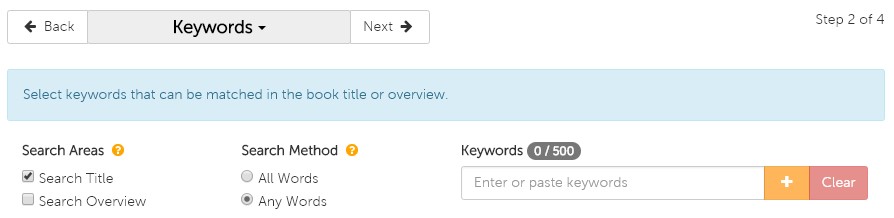
On the Keyword page, you are presented with a couple options before you begin your search—Search Areas and Search Method.
Search Areas
Search Areas determines which fields are included in the search. Under Search Areas, you are given three options:
Search Title: search for your keywords in only book titles
Search Overview: search for your keywords in only book overviews
Both (check the boxes beside both Search Title and Search Overview): search for your keywords in both book titles and overviews
The default is set to search titles only but if you would like a more comprehensive search, we recommend you select both.
Search Method
Search Method determines how exact you would like the list generator to be when populating your list. Under Search Method, you are given two options:
All Words: the search will look for results that include all keywords that are entered (e.g. if you were to enter 10 keywords, only results that include all 10 will be populated)
Any Words: the search will look for results that include any of the keywords that are entered
The default is set to search any words, which will be most commonly used.
Now it’s time to add your keywords! You can either type them in one by one and click the symbol after typing each keyword, or if you have a list already created in a text file or Excel spreadsheet, you can copy and paste that into the search bar. You can see how many words you have added on the counter just above the search bar, where you will be capped at 500.
REPORT FIELDS
On the Report Fields page, you have the ability to select the information you would like included in your downloadable Excel spreadsheet list. We have preselected several for you but you can alter these options to whatever you prefer. You even have the option to include the cover image, but please note that if your list exceeds 1,000 titles, the images will not appear due to file size constraints. When you are satisfied with your selections you can continue to the final step by clicking Next.
FINALIZE
On this last page, you will finalize your list and then move it to a shoppable format or create a template from the list and schedule it to be delivered to your email. The Review section gives you the ability to make any last-minute changes to any of the attributes that make up your list. Since we only selected Keywords for this list, all the other attributes listed should have All included or No filters applied listed. The only attribute that will be impacted from this tutorial is Keywords, and that will specify how many Keywords you selected.
The Name section is your next step, where you simply need to name your list. Once you have done that, you have the option to create a template by checking the box beside Create as template. If you choose to create the template, a scheduling program will appear that gives you several options including frequency of recurrence (weekly, monthly, yearly), start and end dates, day of the week, etc. You need to include the email address(es) that you want to send to list to, and you can also create a subject and message for that email to remind you of what you are receiving. Whether you choose to create a template or not, you must finalize the list by clicking on the green Create button at the bottom of the page.
If you decided to just create the list and not template it, you will see a pop-up to either view the list on our site using a special viewing page which allows you to add items to your cart, or to download the list to an Excel spreadsheet.
TEMPLATES
If you chose to create a template, you will see that list under My Templates. To view it immediately, you need to select Create Now and that list will be moved over to My Lists. By doing so, you now have the ability to open it on the custom view page on the site, or you can also download it to an Excel spreadsheet under Actions.
If you have any questions about this tool or any other functions of our Custom List tool, please contact us!
We think it would be fair to say that many wholesale buyers likely have a go-to list of their favorite authors—whether it’s written down or just a mental list—whose books typically guarantee sales and are always in demand by customers.
With Book Depot’s new Custom List tool, we have created a very easy way for you to upload your unique author list(s) of any size to our list generator. There is no longer a need to plug in one author at a time in the search bar. Now you can upload them all at once and shop the entire list! Once your list is created, you can refer back to it as often as you want or even create a template to have that list emailed to you at the frequency of your choosing.
Video Tutorial
Here is a brief video tutorial to show you how to use this tool:
Step-by-Step Instructions
Once you are logged into your account, you can find our Custom List tool under the profile icon at the top of the webpage in My Lists (or by clicking here). When you get to the page, you may notice that you already have a list or two already created. These are example lists we have created for you to help get you started and to aid your browsing experience.
GETTING STARTED
To create a Favorite Authors list, start by clicking on Create. You will see a list of several attributes that you can create a list from. For the purpose of this tutorial, check the box next to Author and select Next to proceed to the next page.
AUTHOR
On the Author page, allow a few seconds for the page to load with the thousands of authors that are in our database. In the filter bar you can start typing in the names of your targeted authors, but please remember to use the sequence:last name, first name. As you type in the name, the list will begin to filter down your selection until you see the author you are looking for. When you see the author’s name that you are interested in, simply check the box next to their name. You will now see number alongside the Author heading above the filter bar indicating how many authors you have selected.
To make this process even quicker for you, you also have the option to import a list that you have already created in either a text or Excel file. Simply copy and paste your list into the filter bar, remembering again to use the correct format (last name, first name), and all the author matches we have in our database will be added to your list. When you have added all the names you desire, you can move onto the next page by clicking Next.
REPORT FIELDS
On this next page, you have the ability to select the information you would like to be included in your downloadable Excel spreadsheet list. We have pre-selected several for you but you can alter these options to whatever you prefer. You even have the option to include the cover image, but please note that if your list exceeds 1,000 titles, the images will not appear due to file size constraints. When you are satisfied with your selections you can continue to the final step by clicking Next.
FINALIZE
On this last page, it’s now time to finalize your list and then move it to a shoppable format or create a template from the list and schedule it to be delivered to your email. The Review section gives you the ability to make any last-minute changes to any of the attributes that make up your list. Since we only selected Authors for this list, all the other attributes listed should have All included or No filter applied listed. The only attribute that will be impacted from this tutorial is Authors, and that will specify the number of authors you have selected for your list.
The Name section is your next step, where you simply need to name your list. Once you have done that, you have the option to create a template by checking the box beside Create as template. If you choose to create the template, a scheduling program will appear that gives you several options including frequency of recurrence (weekly, monthly, yearly), start and end dates, day of the week, etc. You need to include the email address(es) that you want to send to list to, and you can also create a subject and message for that email to remind you of what you are receiving. Whether you choose to create a template or not, you must finalize the list by clicking on the green Create button at the bottom of the page.
If you decided to just create the list and not template it, you will see a pop-up to either view the list on our site using a special viewing page which allows you to add items to your cart, or to download the list to an Excel spreadsheet.
TEMPLATES
If you chose to create a template, you will see that list under My Templates. To view it immediately, you need to select Create Now and that list will be moved over to My Lists. By doing so, you now have the ability to open it on the custom view page on the site, or you can also download it to an Excel spreadsheet under Actions.
If you have any questions about this tool or any other functions of our Custom List tool, please contact us!
With a whopping bargain book inventory of more than 60,000 different titles, it can be a daunting challenge sifting through all our books to find the titles you are most interested in. Fortunately for our sales team, computers have not replaced our ability to get creative and find new ways to help you overcome the challenge!
While I want to take a few minutes today to talk about some of the unique ways we as sales reps can present our inventory, I believe it’s important to start by giving credit to our IT team. Through our website, our developers created the ability to sort inventory by stock quantity, category, subject, dollar value, binding, plus several more categories to make your job easier. As fantastic as these resources are, there are even more available to you if you utilize our customer service team or your sales representative. While we will always encourage you to review and purchase through our website, I hope this article brings to light a few additional ways that we can help you find titles you may not have seen when scrolling through our daily new arrivals.
To highlight some of the extensive data we have available to us, I’ve prepared some examples of lists we can create for you. Keep in mind that you are not limited to these options; you can request a list any time you think of a way you would like to review our inventory.
Previously Purchased Markdowns
If you are interested in reordering titles previously purchased, we can provide you with a list of books with reduced prices. This “back in stock” list gives you an inside look at the change in pricing by flagging titles that have had a price reduction within the last three months.
Top Purchased Authors
One type of data we have access to is the quantity of titles you have purchased by any given author. If you have purchased 13 titles by the same author and we have 12 others by the same author in stock, there might be a chance you are interested in seeing them! We can even do this for you on a larger scale, by taking your top 25 (or even 50, if you want) purchased authors and running a search based on those authors’ names.
Requested ISBN Lists
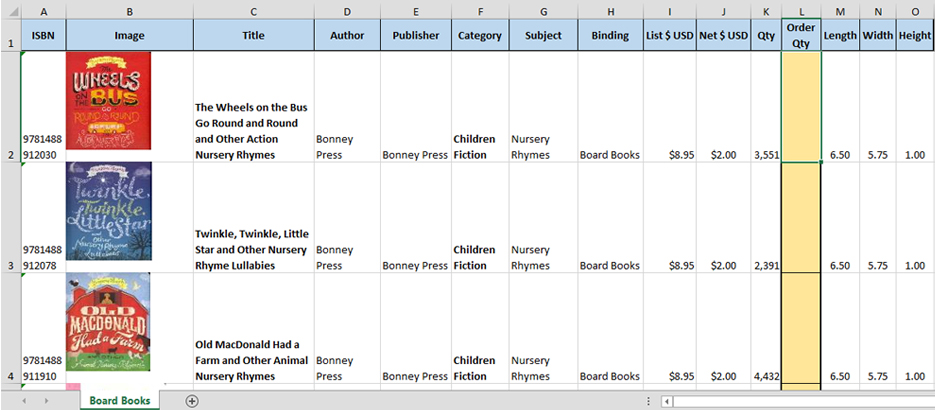
Over time, we have discovered that some bookstores keep a list of ISBNs that they are always on the lookout for. The lists may consist of regional titles, top sellers, a list of titles from a particular category, etc. Rather than entering these ISBNs one at a time on our website to see what is available, we can paste the full list into our software to instantly create a list. The report can display the stock quantity for every title that is in our current inventory along with any other requested details.
To anyone who has not previously worked from a list and is uncertain of what they may look like, please see the example below. This is just one of the many formats of our lists, but no doubt is a good example worth sharing.
Please feel free to reach out to your dedicated sales representative or our customer service team for list inquiries. We are happy to help and hope to make your search an easy one!
Paul Eccles
Sales Representative
Book Depot
Sidebar
Webinar: Maximizing the Book Depot Website
June 27, 2018
Throughout the years, we have been refining our website to make our customers’ buying experience as easy and efficient as possible. If you are new to our website and want to learn about all the features it has to offer,watch the video below. If you are a returning visitor, discover how you can get the most out of our site by leveraging its features to their full potential.
If you prefer to read about the features on Book Depot, we invite you to read this article.
What would you like to see?
Do you have any suggestions or features that you would like to see built into our website to make your buying experience even better? Do you have any positive or negative feedback that you would like to share regarding our current site? Place your suggestions in the comments below.
Sidebar
Book Depot Shopping Experience
February 14, 2018
In the heart of the Niagara Region—a place that is known for its beautiful vineyards, countryside, and of course Niagara Falls—sits the warehouse and home to Book Depot. At a sprawling 450,000 square feet, our building has a long history and likely many stories to tell, starting with its early days as a paper mill all the way to the major reconstruction it underwent to become the fully automated warehouse that it is today (Click here to read more about Book Depot’s origins). Featuring a sortation machine, miles of conveyors, and even robots to help manage the flow of product, it can seem like a complicated operation. As time shifts and the technologies do as well, however, I think there’s one thing that both wholesalers and retailers alike believe—that the physical presence of books is often best appreciated in person.
Technology has afforded buyers some pretty amazing options, such as the ability to simply scan through Excel spreadsheets and PDFs to purchase product for their stores. While these options have proved to be a great resource, the one experience they cannot provide is that of seeing the books in person. Some believe that certain books can be judged by their covers, and that their shelf appeal can be a great factor in their success. Book Depot has for many years opened our doors to wholesale customers from around the globe who, with this principle in mind, have come in the search of new titles.
Why Choose Book Depot?
In dealing with the industry’s leading publishers, our company has been able to amass a collection of almost 60,000 titles, which we’re proud to say leads the bargain book industry in terms of selection. To showcase this selection, we’re extending an invitation to our wholesale customers to come in and see some of the exciting changes we’ve made as a company, as well as shop in a clean, warm, organized, and friendly environment.
Our full inventory can be accessed by perusing the three levels of our main warehouse space, and entering titles into an order couldn’t be easier. We provide handheld scanners, which allow our customers to quickly scan a book’s ISBN to find out the quantity we have in stock, further details, as well as to add it to their order if desired.
As a second option, many of our customers will use our showroom, which generally features books that we have in a higher quantity. Often, this means we have 100+ copies available in our inventory. From within the showroom, you will have the comforts of a kitchenette, WIFI, lots of table space, carts to stack books on, and perhaps even some peace and quiet! At any given time, our showroom features up to 20,000 titles and is updated weekly to add new titles and remove those that have sold out.
Book Depot currently ships to 80+ countries around the world and we’re very proud to have hosted wholesale shoppers from many of them throughout the years. While we understand the challenges that travel presents, we work closely with visitors and receive preferred rates from some of the best hotels that Niagara has to offer. We are also happy to supply a letter of invitation to customers who may be originating from a country that has visitor visa requirements.
To both our long-term and new wholesale customers, you’re invited! We’d love to show you around Book Depot and provide what we consider one of the best shopping experiences you can find in this industry. For further information, please reach out and speak with your sales representative or our customer service team, who will be happy to answer any questions you may have.
Sidebar
Benefits of Shopping Online for Bargain Books
April 6, 2017
The trend of shopping online over the last decade has continued to see strong gains, with global online sales growing at an annual rate of 17% by some accounts and much higher for the Asia-Pacific market. Total online spending is expected to reach $3.5 trillion worldwide by 2019, or about 12.5% of total retail sales, according to some estimates.
When I look at my own purchasing habits and those of my family, I can certainly see why the growth has been strong over the recent years and why it will continue for some time into the future. Often times I find myself looking for that one specific item; perhaps it’s a part for the faucet I need to fix or some snorkel gear for a Caribbean vacation, or a unique light fixture for a home renovation project. My wife, on the other hand, enjoys the selection and ease of shopping right from our own home. For her, time is very important as she manages a busy household, and the ability to not always have to visit the store is invaluable to her. Not to mention, she loves being able to order several sizes with the convenience of returning the ones that don’t fit!
Over the past few years and particularly the last year, we have seen an increase in the volume of sales through our website, www.bookdepot.com, as more and more of our customers realize the benefit and convenience of shopping online for bargain books. Below, we’ll explore a few of the advantages together.
It’s often said that in order to find the best books, you have to visit our warehouse. Although we would certainly encourage all our customers to do so regularly to spend time in our showroom and see the beauty of the Niagara Region, the fallacy of this thinking is unless you are physically searching through our warehouse every day, you can never see the full breadth of what we have to offer. Each day we are adding hundreds of new titles to our inventory and the easiest way to keep track of them is by viewing our new arrivals online. You can sort the new arrivals by date, price, quantity, and a host of other filters. Those of you who actively shop this section know that the great titles go very quickly. Here’s an insider tip: we upload all our new releases at 8:45 PM EST, so make sure you’re ready to fill your cart and check out quickly in order to get what you want.
Shopping at our warehouse can be overwhelming and time consuming, but with shopping online you can use our powerful search engine to narrow down and search for exactly what you are looking for, which can save you valuable time. Obviously the convenience of shopping online is a huge factor; not only is it easy, it’s cost effective as well since your travel costs will be non-existent. You can even shop for bargain books in your PJs while enjoying your morning coffee!
A large factor in the overall rise in online sales has to do with the growth of mobile networks and the use of tablets and smartphones for shopping. With the advancement of technology and the increase in screen sizes, it’s easier than ever to place orders online while on the go. At Book Depot we’ve also made shopping online even more straightforward; just over two years ago we completely redid our website, which now features a fully responsive design that adjusts to the device you are using. Now, regardless of whether you are shopping on your mobile, tablet, or PC, you will be able to experience the same great features. With the site relaunch we are seeing an increase in orders being placed from something other than their PC. Here’s another insider tip about shopping our website: consider adding titles to your cart throughout the day from your mobile or tablet when you have a few spare minutes, or as you think about some product you need to fill holes in your store, then at the end of the day take some time to review your cart, add some more titles, and check out. Keep in mind that orders are not confirmed until submitted so it is possible some titles will be sold out by the time you check out.
In addition to some of the benefits outlined above, our website has many other helpful features, such as our Wishlist and Favorites tools. You can use your Wishlist to create a list of the books you are looking for that we don’t have in stock. If we receive a book on your list, you will be notified by email, at which point you can add it directly into your cart. The Favorites section is a great place for keeping track of in-stock books that you want to purchase at a later time. Through the website you can also review your previous orders and check on the status of recently-placed orders. Click here for more information on how to get the most out of Book Depot’s website.
We encourage you to send us your feedback on your experience shopping online for bargain books. You have our commitment that we will always seek out new ways to better your shopping experience by consistently improving our platform and offering the largest selection of bargain books anywhere on the internet.
 icon at the top of the page and click Check Inventory to get started.
 symbol after typing each keyword, or if you have a list already created in a text file or Excel spreadsheet, you can copy and paste that into the search bar. You can see how many words you have added on the counter just above the search bar, where you will be capped at 500.