Small Budgets, Big Dreams: 4 Strategies to Stretch Your Impact

May 8, 2024

In a world where every dollar counts, stretching your budget to achieve the lofty goals of your organization might seem like an impossible task. Especially in the face of economic challenges and the corresponding budget constraints that go along with them. That’s why we’re sharing some insider tips on how to stretch your dollars to have the biggest impact. Whether you’re an educator shaping the minds of your students, a nonprofit advancing literacy, or an indie bookstore owner supporting your local community, this one’s for you!

A Bargain Speaks for Itself

Before we jump into our top buying strategies for wholesalers, let’s start with the obvious. Unbeatably low prices will get you more for your budget dollars. At Book Depot, we offer wholesale bargain books up to 90% off the publisher’s suggested retail price (SRP). Buying bargain versus direct from your front-list distributer is the first step to maximizing your purchasing power.

Strategies for Wholesale Book Buying

We understand that most buyers operate within a fixed budget. Sure, your budget might limit the amount of physical product you can buy, but it’s not just about the price tag on the products; it’s about the value you receive in return. Here are our top tips for making the most of your budget when buying books for your business.

1. Leverage Volume Discounts

The concept is simple; at Book Depot, when you buy more, you save more. We offer automatic volume discounts on regular priced products so our customers can capitalize on bulk-buying benefits. Check out our three discount tiers based on product quantity:

  • 75 – 149 copies per title = 5% discount
  • 150 – 249 copies per title = 10% discount
  • 250+ copies per title = 15% discount

2. Shop Markdowns

Keeping an eye out on our markdowns will help you stretch those budget dollars further. Join our e-newsletter to receive emails about our discounted products so you can shop thousands of titles at even lower prices.

3. Save on Shipping Costs

Book Depot provides smart solutions that increase the profitability of your purchases with our consolidated shipping options.

As fuel and shipping costs rise, combining multiple orders into one bulk shipment can greatly reduce your expenses and enhance your buying power.

If you prefer to accumulate orders over several days or weeks, worried that sought-after books might disappear from your cart, we’ve got you covered. Place your orders within a shorter timeframe, and we’ll consolidate them for you. This ensures you don’t miss out on popular titles because of prolonged purchasing periods.

Plus, you always have the flexibility to choose your own carrier or use one of ours.

4. Connect with a Rep

When you shop at Book Depot, you’re not just purchasing books; you’re investing in an experience. And no one knows more about how to add value to your experience than our reps.

From personalized recommendations to industry insights, they’re here to make your shopping journey as seamless and enjoyable as possible. And the best part? It won’t cost you a penny extra. Email our reps at [email protected] for more information.

By leveraging the additional services and benefits that come with your purchase, you’re not only saving time and money, but you’re also increasing the overall value of your investment.

So, the next time you’re shopping on a tight budget, remember this: it’s not just about what you can afford to buy; it’s about what you can afford to gain. And with Book Depot by your side, you can keep dreaming big for your organization.

Sidebar

Smart Tools for Easier Buying: Leveraging Our Custom Website Tools

December 12, 2023

Are you using Book Depot’s website tools to their fullest capabilities? We’ve made the book buying process so much easier for our customers through the creation of custom tools to help them search for the books they want. Gone are the days of having to painstakingly type in authors one-by-one and juggling multiple keywords to uncover books in line with customers’ interests.

With our Custom List Creator, you set the criteria. This tool empowers you to tailor lists according to your specific needs and preferences. Save your customized lists for future use, set up templates to have them emailed to you, and choose both the day and frequency for receiving these lists. Doesn’t that sound like a time-saver?

Moreover, enhance your experience by applying advanced filters. Precision is at your fingertips as you refine results by quantity, concentrate on budget-friendly price points, identify in-stock arrival dates, specify preferred publishers, and eliminate redundancy by excluding previously viewed lists.

Curious about this tool’s secret hideout? After logging in, just click the person icon at the top, then navigate to My Lists. Click ‘Create,’ and voila! You can customize your list across various categories including:

  • Category
  • Publisher
  • Author
  • Format
  • Price & Quantity
  • Arrival Date
  • Demographic
  • Keywords
  • Exclude Lists

At Book Depot, we’re not just about offering an extensive book selection at great prices; we’re on a mission to make your shopping smarter, so you can maximize your resources. Say hello to efficiency with tools that put convenience at your fingertips.

Sidebar

Unlocking Success: The Magic of Bargain Books in Your Store

November 29, 2023

In the dynamic world of retail, finding the perfect balance between quality offerings and budget-friendly choices is an art. One avenue that holds immense potential for both customers and store owners is the realm of bargain books. These treasures not only delight avid readers but also open up new avenues for sales growth and customer loyalty. Let’s explore the benefits of incorporating bargain books into your inventory and how to maximize their sales in your store.

  1. Broadening Customer Base

Bargain books act as a magnet for a diverse audience. While budget-conscious readers are drawn to the affordability, others might be enticed to explore new genres or authors they wouldn’t have considered at regular prices. By offering discounted books, you attract a wider customer base, making your store more inclusive and appealing.

  1. Boosting Impulse Purchases

A well-displayed section of bargain books near the checkout counter can spark impulse purchases. Customers often find it hard to resist a good deal, especially when it comes to adding an affordable gem to their purchase. Consider strategically placing bargain books in high-traffic areas to capitalize on these impromptu buying decisions.

  1. Building Customer Loyalty

Bargain books can serve as a gateway to cultivating long-term relationships with your customers. By offering them affordable options, you demonstrate a commitment to providing value, creating a positive shopping experience. Satisfied customers are more likely to return, and with word-of-mouth marketing, your store can become a go-to destination for both quality and savings.

  1. Creating Theme-Based Displays

Maximize the appeal of bargain books by creating theme-based displays. Whether it’s seasonal discounts, genre-specific promotions, or highlighting hidden gems, organizing your discounted selection in an attractive and organized manner can significantly enhance their appeal. Visual storytelling around the bargain books encourages customers to explore and discover new titles.

  1. Leveraging Social Media for Promotion

Harness the power of social media to promote your bargain book offerings. Share regular updates on these titles or host online book discussions around these budget-friendly options. Engaging with your audience through platforms like TikTok, Facebook, Instagram, or Twitter can amplify your store’s visibility and attract a broader online audience. Stay connected to BookTok for what’s trending, as a lot of bargain book titles are highly sought after.


Incorporating bargain books into your retail strategy isn’t just about providing affordable options; it’s about creating an experience that resonates with your customers. By maximizing the benefits of bargain books, your store can become a haven for both savvy readers and those looking to embark on new literary adventures without breaking the bank. Unlock the magic of affordability and watch as your store transforms into a thriving hub for book enthusiasts of all kinds.


Sidebar

Custom List Tool: Multiple Keyword Search

February 1, 2019

Have you ever found yourself searching keyword variation after keyword variation to see all of the books available about a certain topic? The time has come where that manual (and no doubt tedious) process is no longer needed!

With Book Depot’s new Custom List tool, we have created a very easy way for you to search your keywords in our list generator. Now you have the ability to enter multiple keywords at one time and receive an immediate list of all the results where the keywords appear in the title and/or overview! For example, if you are interested in a list of keywords that is pertinent to your location, you may be searching for words related to the city, state, province, and/or country as well as any significant terms tied to your surrounding landmarks or geographical features. Now you can take all those keywords, compile them into one list, and search that against our entire inventory to find books that will be important to your business.

What’s even better is that once your list is created, you can refer back to it as often as you want or even create a template to have that list emailed to you at the frequency of your choosing.


Video Tutorial

Here is a brief video tutorial to show you how to use this tool:


Step-by-Step Instructions

Once you are logged into your account, you can find our Custom List tool under the profile icon at the top of the webpage in My Lists (or by clicking here). When you get to the page, you may notice that you already have a list or two already created. These are example lists we have created for you to help get you started and to aid your browsing experience.


GETTING STARTED

To create a Keyword list, start by clicking on Create. You will see a list of several attributes that you can create a list from. For the purpose of this tutorial, check the box next to Keywords and select Next to proceed to the next page.


KEYWORDS

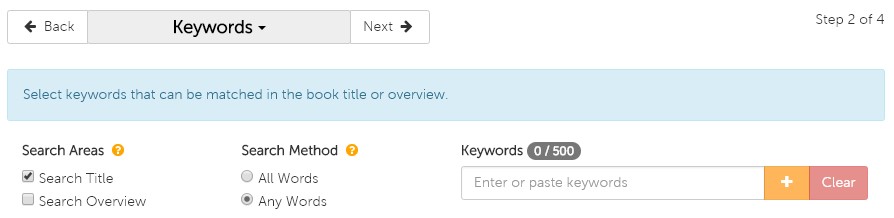
On the Keyword page, you are presented with a couple options before you begin your search—Search Areas and Search Method.


Keyword options


Search Areas

Search Areas determines which fields are included in the search. Under Search Areas, you are given three options:

  1. Search Title: search for your keywords in only book titles
  2. Search Overview: search for your keywords in only book overviews
  3. Both (check the boxes beside both Search Title and Search Overview): search for your keywords in both book titles and overviews

The default is set to search titles only but if you would like a more comprehensive search, we recommend you select both.


Search Method

Search Method determines how exact you would like the list generator to be when populating your list. Under Search Method, you are given two options:

  1. All Words: the search will look for results that include all keywords that are entered (e.g. if you were to enter 10 keywords, only results that include all 10 will be populated)
  2. Any Words: the search will look for results that include any of the keywords that are entered

The default is set to search any words, which will be most commonly used.


Now it’s time to add your keywords! You can either type them in one by one and click the  symbol after typing each keyword, or if you have a list already created in a text file or Excel spreadsheet, you can copy and paste that into the search bar. You can see how many words you have added on the counter just above the search bar, where you will be capped at 500.


REPORT FIELDS

On the Report Fields page, you have the ability to select the information you would like included in your downloadable Excel spreadsheet list. We have preselected several for you but you can alter these options to whatever you prefer. You even have the option to include the cover image, but please note that if your list exceeds 1,000 titles, the images will not appear due to file size constraints. When you are satisfied with your selections you can continue to the final step by clicking Next.


FINALIZE

On this last page, you will finalize your list and then move it to a shoppable format or create a template from the list and schedule it to be delivered to your email. The Review section gives you the ability to make any last-minute changes to any of the attributes that make up your list. Since we only selected Keywords for this list, all the other attributes listed should have All included or No filters applied listed. The only attribute that will be impacted from this tutorial is Keywords, and that will specify how many Keywords you selected.

The Name section is your next step, where you simply need to name your list. Once you have done that, you have the option to create a template by checking the box beside Create as template. If you choose to create the template, a scheduling program will appear that gives you several options including frequency of recurrence (weekly, monthly, yearly), start and end dates, day of the week, etc. You need to include the email address(es) that you want to send to list to, and you can also create a subject and message for that email to remind you of what you are receiving. Whether you choose to create a template or not, you must finalize the list by clicking on the green Create button at the bottom of the page.

If you decided to just create the list and not template it, you will see a pop-up to either view the list on our site using a special viewing page which allows you to add items to your cart, or to download the list to an Excel spreadsheet.


TEMPLATES

If you chose to create a template, you will see that list under My Templates. To view it immediately, you need to select Create Now and that list will be moved over to My Lists. By doing so, you now have the ability to open it on the custom view page on the site, or you can also download it to an Excel spreadsheet under Actions.


If you have any questions about this tool or any other functions of our Custom List tool, please contact us!

Email: [email protected]

Phone: 1-800-801-7193

Sidebar

Custom List Tool: Favorite Authors List

January 16, 2019

We think it would be fair to say that many wholesale buyers likely have a go-to list of their favorite authors—whether it’s written down or just a mental list—whose books typically guarantee sales and are always in demand by customers.

With Book Depot’s new Custom List tool, we have created a very easy way for you to upload your unique author list(s) of any size to our list generator. There is no longer a need to plug in one author at a time in the search bar. Now you can upload them all at once and shop the entire list! Once your list is created, you can refer back to it as often as you want or even create a template to have that list emailed to you at the frequency of your choosing.


Video Tutorial

Here is a brief video tutorial to show you how to use this tool:


Step-by-Step Instructions

Once you are logged into your account, you can find our Custom List tool under the profile icon at the top of the webpage in My Lists (or by clicking here). When you get to the page, you may notice that you already have a list or two already created. These are example lists we have created for you to help get you started and to aid your browsing experience.

GETTING STARTED

To create a Favorite Authors list, start by clicking on Create. You will see a list of several attributes that you can create a list from. For the purpose of this tutorial, check the box next to Author and select Next to proceed to the next page.

AUTHOR

On the Author page, allow a few seconds for the page to load with the thousands of authors that are in our database. In the filter bar you can start typing in the names of your targeted authors, but please remember to use the sequence: last name, first name. As you type in the name, the list will begin to filter down your selection until you see the author you are looking for. When you see the author’s name that you are interested in, simply check the box next to their name. You will now see number alongside the Author heading above the filter bar indicating how many authors you have selected.

To make this process even quicker for you, you also have the option to import a list that you have already created in either a text or Excel file. Simply copy and paste your list into the filter bar, remembering again to use the correct format (last name, first name), and all the author matches we have in our database will be added to your list. When you have added all the names you desire, you can move onto the next page by clicking Next.

REPORT FIELDS

On this next page, you have the ability to select the information you would like to be included in your downloadable Excel spreadsheet list. We have pre-selected several for you but you can alter these options to whatever you prefer. You even have the option to include the cover image, but please note that if your list exceeds 1,000 titles, the images will not appear due to file size constraints. When you are satisfied with your selections you can continue to the final step by clicking Next.

FINALIZE

On this last page, it’s now time to finalize your list and then move it to a shoppable format or create a template from the list and schedule it to be delivered to your email. The Review section gives you the ability to make any last-minute changes to any of the attributes that make up your list. Since we only selected Authors for this list, all the other attributes listed should have All included or No filter applied listed. The only attribute that will be impacted from this tutorial is Authors, and that will specify the number of authors you have selected for your list.

The Name section is your next step, where you simply need to name your list. Once you have done that, you have the option to create a template by checking the box beside Create as template. If you choose to create the template, a scheduling program will appear that gives you several options including frequency of recurrence (weekly, monthly, yearly), start and end dates, day of the week, etc. You need to include the email address(es) that you want to send to list to, and you can also create a subject and message for that email to remind you of what you are receiving. Whether you choose to create a template or not, you must finalize the list by clicking on the green Create button at the bottom of the page.

If you decided to just create the list and not template it, you will see a pop-up to either view the list on our site using a special viewing page which allows you to add items to your cart, or to download the list to an Excel spreadsheet.

TEMPLATES

If you chose to create a template, you will see that list under My Templates. To view it immediately, you need to select Create Now and that list will be moved over to My Lists. By doing so, you now have the ability to open it on the custom view page on the site, or you can also download it to an Excel spreadsheet under Actions.

If you have any questions about this tool or any other functions of our Custom List tool, please contact us!

Email: [email protected]

Phone: 1-800-801-7193

Sidebar

Webinar: Maximizing the Book Depot Website

June 27, 2018

Throughout the years, we have been refining our website to make our customers’ buying experience as easy and efficient as possible. If you are new to our website and want to learn about all the features it has to offer, watch the video below. If you are a returning visitor, discover how you can get the most out of our site by leveraging its features to their full potential.


Website features covered (in order of reference):

If you prefer to read about the features on Book Depot, we invite you to read this article.


What would you like to see?

Do you have any suggestions or features that you would like to see built into our website to make your buying experience even better? Do you have any positive or negative feedback that you would like to share regarding our current site? Place your suggestions in the comments below.

Sidebar

The Survey Says – Make Your Business Stronger

May 9, 2018

How do your customers truly feel about you? Are you their “go to” source for books? Should you be restyling your store, or offering more products? I am sure these questions and countless others are always top-of-mind for all booksellers, but formalizing the process may get pushed aside in the hectic daily running of your business. One way to truly know how you are perceived – surveying your customer base. At Book Depot we query our constituents for each of our lines of business on an annual basis. We use this data to reflect on where we’ve been and as an important tool for planning our future. Some of the benefits of taking the time to properly plan and execute a surveying initiative include:


  1. Customer appreciation. People inherently love to feel valued and that they have a voice that is heard. They will be impressed that you respect their opinion enough to ask them how you are doing.
  2. Customer retention. Customer acquisition is tough and extremely expensive. Satisfying your customer’s needs will keep them coming back – increasing their lifetime value and providing a revenue stream that will be easier to forecast.
  3. Free information. Utilizing your own client base for information comes at no cost (other than time) and will be completely pertinent to your business as all the questions are about your business.
  4. Improve problem areas. We all like to think that each aspect of our business is running smoothly. Sometimes it takes an outside perspective to recognize the areas that need to be addressed.
  5. Recognize trends. Are you carrying the right mix of categories and keeping your finger on the pulse of the industry? Can you expand your product lines by carrying higher margin products? Asking product based questions will reduce your fiscal risk by identifying fact-based gaps in your selection. (It is impossible for one person to know everything there is to know about the publishing world.)
  6. Establishing a baseline. Performing surveys consistently over a length of time will provide you an opportunity to gauge yourself against yourself. Track all the changes you made and monitor how they are received.


I know what you must be thinking, theoretically I see the value – but I don’t have the time or know where to even begin. Let me assure you that it has never been easier than it is today. To make the process manageable, we have broken it down into three basic steps to help ensure your initiative will have success:


Scripting the Survey

  1. Pinpoint exactly what you want to know (i.e. should we expand our bargain book section?).
  2. Use basic language. Stay away from industry lingo that could confuse your customer.
  3. Keep the questions as short as possible and never exceed a total of 10. Only ask the questions that will not have the biggest impact on success.
  4. Utilize the Net Promoter Score (NPS). Book Depot ends every survey by asking, “How likely is it that you would recommend us to a friend, or colleague”. We feel this is the most powerful way to gauge the overall health of your business. Willingness to recommend your store to a friend, is extremely powerful.


Administering the Survey

  1. Choose a web-based survey provider. We use Survey Monkey for all of ours. It is extremely user friendly, offers great examples & step-by-step tutorials and provides the data in a manageable format.
  2. Define who you want to query. Are you looking to poll your entire list or are you really looking for information from a specific subset of customers in your database?
  3. Decide if you want to provide an incentive. Often times we will offer a predefined discount off the customer’s next purchase if they complete the survey.
  4. Design the survey. Most provide an extremely user-friendly template, so all you need to do is cut-and-paste your questions.


Analyzing the Results

  1. Calculate the response rate (divide the number of completed surveys by the total number of surveys sent). The higher the response rate, the more representative and trustworthy the data will be. Aim for over 10%.
  2. Be open minded. Listen to what the data is really telling you, not what you want it to tell you… this can be harder than you would think.
  3. Categorize the data. “Bucketing” your responses by area of your business will make it easier to focus on the specific needs of each.
  4. Look at your results on both a micro and macro and level. You will glean key “nuggets” by looking at both.
  5. Thank your respondents. Let them know how much you appreciate their time and how you plan to utilize the responses to better serve their book buying needs in the future.


As David Penn succinctly stated, “Measuring engagement and engaging consumers are two sides of the same coin.” At Book Depot this is one of our mantras. We know that not only have our customers made us who we are today, but make us who we will be in the future. If we want that future to be successful, we must keep our finger on their collective pulse.


Making customer surveys a key part of your annual planning will pay off with making your store stronger and more profitable, while keeping your customers loyal!


Greg Sizelove

Business Development Manager

Book Depot

Sidebar

Creative Merchandising Ideas

February 28, 2018

Does your store stand out from the crowd? Does it excite customers? Is there a way you can beef up your merchandising to increase sales? Is that even possible in a bookstore? I say YES! Having 11+ years’ experience working for a major book retailer in Canada, I have seen many ways to increase sales via in-store merchandising. People come to your brick-and-mortar store to discover new items, to be WOWED. Making your store stand out from the competition is crucial to staying healthy and profitable in this competitive marketplace. Not only are you competing with other brick-and-mortar stores, you are now competing with online retailers too. Therefore, creative merchandising becomes even more important. You want to provide your customers with the ultimate shopping experience!  Here are six easy ways to boost sales, while making an aesthetic impact on your store.


Change displays biweekly

All of us know that it is crucial to merchandise displays to follow holidays, seasons, etc. But is that really enough? Keep your store vibrant and fresh by switching your displays on a biweekly schedule whenever it is possible. This will keep customers excited and looking forward to see what’s new when they return.


Is your cash lineup exciting?

New arrivals should be displayed near the front of the store. Most book retailers have ample new arrivals weekly. Keeping your cash lineup fresh gives you more opportunity to entice your customers to impulse buy an item they didn’t even come into your store for. Alongside these sought-after new arrivals, display easy add-on items (low ticket priced items – like bargain books) to increase your customers’ basket size.


Tables should tell a story

Grouping like products together will give your customers additional reasons to buy more items from you, saving them time mixing and matching categories and topics that interest them. All tables should tell one cohesive story. A customer is looking for a complete solution. For example, if doing a Mother’s Day table and you are featuring some books on tea, cross merchandise this with tea, tea cups, and cookies, for example. Table displays that tell a story are more interesting to a shopper and potentially much more profitable to you as a retailer.


End-caps

End-caps should be used to display new releases or older books by popular authors. When customers browse through your store and pass by the ends of your shelves, they can be influenced by what is displayed. Use end-caps creatively by adding products such as book lights, reading glasses, or gift cards. Adding one or two higher-margin products to every basket can really affect your bottom line.


Back of store merchandising

Categories such as Science, New Age, and Crafts and Hobbies, to name a few, should be placed in the depth of your store. Less impulse in nature, customers will travel to the back of your store to find these categories. By doing this you will increase the chances of those customers putting other items in their basket, increasing their basket size.


Make the shopping experience a comfortable one

Most shoppers shop with another person; a spouse, a friend, or a child. The more uncomfortable the spouse, friend, or child may get, the less time your customer will spend in your store browsing and adding to their basket.

Examples may include: chairs and sofas to make browsing more comfortable, ample heat/air-conditioning, or sufficient room to maneuver between shelves and tables.


These are just a few ideas to get your juices flowing. You will have many unique ideas that tailor to your store and your target customer. Have fun and be creative!


Tracy Basnett

Book Depot

Category Manager

Sidebar

Hiring Basics: Tips to Help Find the Right People

December 27, 2017

Hiring is not an easy task, but if you have a good plan in place, you’ll be well on your way to finding the right people for your company. Read on for some tips and guidelines to keep in mind when you’re hiring your next team member.


Know the Position You’re Hiring For

Before you post a job ad, the first thing you should do is come up with a list of responsibilities for the position. This will serve as the basis for the rest of the hiring process. If you’re overseeing the hiring for a department that you’re not part of yourself, ask the department manager or supervisor for more details—they will have the best idea of their department’s specific needs. Beyond job responsibilities, some other basic factors to consider are: Is this a brand new position, or are you looking to fill an existing one? Is it full time, part time, or contract? What will the salary or hourly wage be? How many hours per week does the position require? Is it an entry-level position for which candidates do not need any previous experience, or is experience/schooling necessary? Knowing all of this information beforehand will help you find the most suitable candidates for the position, as well as help prevent you from inadvertently representing the position in a misleading or contradictory way.


Have a Plan

You’ve posted a great ad and interested candidates have sent in their resumes. Now you’ll need to prepare an order of operations for the selection process: Which staff members will be participating in the interviews? What will their roles be? Will there be one interview or two (or more)? Will the first interview be conducted via phone? Will you issue a personality/aptitude assessment, or a project? What is the expected timeline? When will you contact candidates for each stage of the process? Having a clear roadmap (and communicating it with your candidates) will help keep you on track, organized, and professional.


Consistency is Key

It is important to treat all candidates fairly throughout the selection process. Come up with a standard list of questions to ask everyone you interview for the position. If you plan to issue an assessment or project, ensure you use the same terms, timeline, and criteria for each candidate. Using consistent evaluation methods for everyone will go a long way in helping you to determine the successful candidate.


No Surprises

Make sure you and your candidates are on the same page from start to finish. If you’re hiring for a contract position that has a definite end date, clearly specify this in the job ad and reiterate it during the interview process. If the position requires specific experience, education, or equipment, be upfront about it; don’t wait until both you and your candidates have invested a significant amount of time in the selection process to find out you’re not going to be a good fit for each other.


Take Notes

Whether you’re meeting with three candidates or ten, it’s good practice to take thorough notes each time you sit down for an interview. With everything else that is going on in your busy day, remembering who said what will be one less thing you have to worry about. You’ll also have something tangible to refer back to for any follow-up interviews or contact, making it that much easier to navigate the selection process.


Consider the Culture of Your Workplace

Your company’s culture—which is continuously reshaped by everything from the unique personalities of your staff members, to the goals and values of your company, to the working environment itself—plays a large part in both hiring and retention. A thriving company culture attracts qualified applicants, and perhaps more importantly, gives them a good reason to stay! When hiring, look for candidates who have the potential to positively impact your company’s culture; our CEO Wilf Wikkerink wrote a fantastic blog post at the beginning of the year titled “The Right People on the Bus” that covers this topic in greater detail—we suggest you check it out.


Have any questions or tips of your own you’d like to share? Leave a comment below or email us directly at [email protected]—we’d love to hear from you.


Faeryn Genovese

Book Depot

Human Resources Coordinator

Sidebar

The Right People on the Bus

September 27, 2017

It is often said that people are your greatest asset, but Jim Collins said it much better in his national bestseller Good to Great when he wrote, “People are not your most important asset.  The right people are.”[i] Collins used the analogy of the company being like a bus and spoke a lot about getting the right people on the bus (the company) and that once you get the right people on the right seats (the right positions) of the bus, you can drive the bus anywhere. The reality is we will often spend more time with our colleagues than with our family members, so getting the right people on the team is of paramount importance to building a successful company and one that people want to be a part of.


Increasingly over the past number of years I have realized that attitude is everything when it comes to getting and retaining the right people. There’s a common saying that we should hire for attitude and train for skill, and I believe this is more relevant than ever as the pace of change in business continues to move at an alarming rate. Employees who are positive, love life, and are engaged in the vision of the company will adapt quicker to change and are more willing to follow leaders who take them down new and uncharted territories. Of course, there are certain hard skills that are required for any job and some more so than others—I would most certainly fail if I was hired to be the head programmer of a software development company. However, a highly skilled and experienced member of your team with a negative attitude will be a cancer in your organization and will ultimately fail themselves. Someone who has less experience and fewer hard skills but a positive and infectious attitude will always outlast the more skilled employee and will be much more beneficial to the overall culture of your company.


Jack Welch outlines five qualities in his book Winning that we need to look for in people to create a winning team. These five qualities are: positive energy, the ability to energize others, the courage to make tough yes/no decisions, the ability to execute, and passion.


When you read through the above list it seems so simple, and yet so many of us hire people with only some or none of these qualities. Then, when we realize we’ve made a mistake, we lack the courage to move those people out of the organization for their own well-being and the good of the company. One of the first questions I ask my HR manager after an interview is, “did they have good energy”? Who doesn’t want someone on their team who comes into work each day with a smile on their face and the attitude that he/she can take on whatever comes their way?


Those who have energy are also infectious to those around them; if they are excited about life, both at home and at work, it will energize those around them to be the same way. You can see how a few of the right people with positive attitudes can have a huge impact—I’ve seen whole departments completely turn around by getting the right people in the right seats on the bus, and it’s one of the most rewarding things to witness as a leader.


One of the more difficult soft skills to hire for is what Jack Welch calls “edge.” We must find people that have the courage to make tough yes/no decisions. Anyone can analyze a situation from every angle, but great people have the ability to cut through the murkiness and make the call. Many difficult calls must be made with little information and will require that gut decision. As leaders, we need to encourage our team members to make decisions, knowing that sometimes they will make the wrong one. It is important that we impart to our team members that they won’t “get shot” for making the wrong decision as long as they learn and grow from it.


The next key quality is the ability to execute. We may be able to find someone who has the energy, excels at energizing others, and has the courage to make tough decisions, but if they cannot execute, nothing will get done. Successful teams are full of people who can see the end goal and map out a plan to reach the goal, no matter what comes their way. Having goal-driven people on your team is absolutely imperative to delivering results year after year. One of my favorite business books on the subject of execution is Execution: The Discipline of Getting Things Done by Larry Bossidy and Ram Charan—it is definitely a business book you want on your to-be-read list.


The last quality is the notion of passion. Successful teams are full of people who absolutely love their work. They enjoy coming to work each day and ultimately feel like they’ve never worked a day in their life. The right people aren’t just passionate about work, however; they are normally passionate about all of life. They have a vigor for life, whether that be in their hobbies, their family life, their churches, sports clubs, etc., and they live fulfilled, purposeful lives.


If you find people with these qualities, do everything you can to retain them, take care of them, grow them, and reward them for successes; by doing so, you will create a team with A players who will be a pleasure to work with and will consistently deliver results for your company. I’d like to leave you with this closing quote from Jim Collins in his book Good to Great:


For no matter what we achieve, if we don’t spend the vast majority of our time with people we love and respect, we cannot possibly have a great life. But if we spend the vast majority of our time with people we love and respect – people we really enjoy being on the bus with and who will never disappoint us – then we will almost certainly have a great life, no matter where the bus goes. The people [we] interviewed from the good-to-great companies clearly loved what they did, largely because they loved who they did it with.[ii]


Wilf Blog Signature

————————————————————————————————

[i] Jim Collins, Good to Great (New York: HarperCollins, 2001), 13.

[ii] Collins, Good to Great, 62.

Sidebar